A complete step-by-step guide to downloading, installing, and configuring the TT-Miner GPU miner on Windows. We cover system requirements, algorithms, and features in detail, along with practical tips for efficient mining. NVIDIA (and some AMD) support, a 1% developer fee, and updates are included.
What’s new in TT 2024.3.1
- New: CPU-Algo XELIS (version 2) and the associated cryptocurrency XEL.
- New: Now you can connect to EPIC and any CPU algorithms.
- Bugfix: Fixed extranonce bug for spectre-pools.
What is TT-Miner and why is it needed?
“I think I’ve tried everything!” is a phrase every miner probably thinks when faced with choosing a GPU mining program. But the emergence of TT-Miner turns this conventional understanding on its head: this miner isn’t just another mining software, but something like a Swiss Army knife among programs. Initially, it was positioned as an effective NVIDIA GPU miner (Windows/Linux), supporting 10+ algorithms and dozens of coins. Later, the developers added partial AMD support, as well as the ability to mine on a CPU or iGPU. As the developers point out, TT-Miner is a closed-source miner with a default developer fee of 1% . In other words, it’s free to download, but it takes a “tip” from your earnings—just 1%, which compares favorably to the 2-3% fees of other programs.
Why is TT-Miner so popular? Because it impresses with its versatility. Key algorithms are supported: ProgPoW, KawPow, Etchash (ETC), Ethash , and others. No, you heard right: it covers mining Ravencoin on KawPow, Ethereum Classic on Etchash, and even altcoins on ProgPoW/UBQHash and Lyra2REv3. In short, TT-Miner can mine dozens of coins: the Minerstat service lists around 10 algorithms and 42 coins that can be mined with this software. One compelling argument for TT-Miner is the ability to alternate mining two coins (for example, the main cryptocurrency and bonus altcoins), as well as the ability to save DAG data to disk or RAM. This means that this miner can mine even on older graphics cards with limited memory thanks to its DAG management technology.
If you thought GPU miners would become obsolete after Ethereum’s transition to PoS, we have good news. Ethereum is history, but TT-Miner mines everything else. It’s essentially like checking a key against all locks at once: ProgPoW for Zano, KawPow for Ravencoin, Ethash/Etchash for Ethereum Classic, and more—TT-Miner “knows” them all. The authors of Crazy-Mining even mention that TT-Miner has long supported ProgPOW, Ethash, UBQhash, MTP, Lyra2REv3, Epic, EagleSong, and Kadena algorithms. In short, if you need an omnivorous NVIDIA miner with minimal overhead, take a closer look at TT-Miner.
Key Features and Capabilities
- Supported algorithms : The program works with popular algorithms such as Ethash (Ethereum Classic), ProgPoW , MTP , KawPow and many others.
- NVIDIA Optimization : The software is written specifically for GPU architectures Maxwell, Pascal, Turing, and Ampere.
- Features : Includes tools for monitoring temperatures, controlling fan speeds, and overclocking cards directly through configuration files or the command line.
- Developer Fee (DevFee) : Like most similar programs, TT-Miner charges a small fee (usually around 1%), which is automatically transferred to the author during the mining process.
- Setup : To launch
.bat, files are used that specify the pool address, wallet number, and selected algorithm. - Compatibility : The program is integrated into many mining operating systems (for example, HiveOS or RaveOS) and managers like Awesome Miner
💻 System requirements and compatibility
Before installation, it’s important to ensure your computer meets the requirements. According to official data and reviews, TT-Miner runs on Windows 7/8.1/10 (64-bit) and supports NVIDIA graphics cards. Driver 441.31 or later is recommended (this roughly corresponds to CUDA 10.0+ drivers). Many reviews report that installing Microsoft Visual C++ 2017/2019 may be necessary (for example, if a missing VCRUNTIME140_1.dll error appears at startup , installing the appropriate runtime resolves this). Officially, the developers indicate that TT-Miner can also run on some AMD GPUs (with the exception of the Ghostrider algorithm), and CPU/integrated graphics mining can be enabled via the -cpu/ options -igpu.
- Windows 7/8.1/10 (x64) – 64-bit OS versions.
- NVIDIA graphics cards (for older AMD versions, check the v3.x releases; newer versions are NVIDIA-focused).
- GPU driver : for correct operation, you need an NVidia driver not lower than 441.31 (CUDA 10.0).
- Visual C++ Package : If you experience DLL loading errors, we recommend installing the Visual C++ Redistributable for VS 2015–2019.
- Internet : Mining requires a constant connection to the pool. It is highly recommended to allow the miner through your firewall and antivirus software (it may detect the miner as potential malware).
Overall, TT-Miner will hit the target very quickly on a modern machine: many reviews note that the program itself is portable (no installation required). All you need is an unpacked archive with the required miner version and sample .bat files.
How to download TT-Miner on Windows
Download TT-Miner only from trusted sources . The best option is the official website and the developer’s repository. Current versions of TT-Miner are available on GitHub (TrailingStop/TT-Miner-release) or on tradeproject.de. For example, there’s a direct link https://TradeProject.de/download/Miner/TT-Miner.zip. Try to avoid dubious mirrors and suspicious torrent files—sometimes third-party sites disguised as miners distribute malware. If you download an unofficial build, at least check the checksum and the distribution’s reputation.
You can also find builds and guides from bloggers online (some sites like Crazy-Mining.org, , and publish TT-Miner releases with brief reviews). These can be useful, but be sure to download the executable file from the official source . After downloading the TT-Miner.zip archive, simply unzip it to a convenient location on your disk.
Security check: Of course, any miner can trigger antivirus software (due to intensive GPU work, registration changes, etc.), but TT-Miner itself is officially virus-free. If your AV software complains, add the miner folder to the exceptions list or temporarily disable protection (this is safe when downloading from an official source).
🛠 Installation and first launch
This completes the installation – TT-Miner doesn’t require any complicated steps. You’ll see the unpacked archive as a folder containing the executable file TradeTec-MinerCmd.exe (sometimes older versions were simply called TT-Miner.exe), and next to it are usually the prepared .bat files and instructions. So, in fact, “installation” is simply unpacking the archive.
The next steps to get started are simple:
- Download the TT-Miner.zip archive and unzip it to any folder (for example, C:\Miner\TT-Miner) – the program itself is portable, there is no need to install it on the system.
- Edit the .bat file. The unzipped folder should already contain sample files with the extension
.bat. Open one of them in any text editor and replace the wallet address with your own. This is where you specify where the coins will be deposited. Sometimes the file examples already sayYOUR_WALLET.YOUR_WORKER@pool:port. Delete itYOUR_WALLETand paste your wallet, and replace itYOUR_WORKERwith the name of your rig/farm (or just leave it as is). - Save the .bat file and run it. Double-clicking the .bat file will launch the miner’s command line. The console should display lines like [ ]
Found X CUDA devices, followed by DAG initialization, connection to the pool, and the start of mining.
Important: If the program returns an error about the file when you first launch it
VCRUNTIME140_1.dll, download and install Microsoft’s Visual C++ Redistributable (2017/2019). After that, re-run the .bat file – everything usually works fine again.
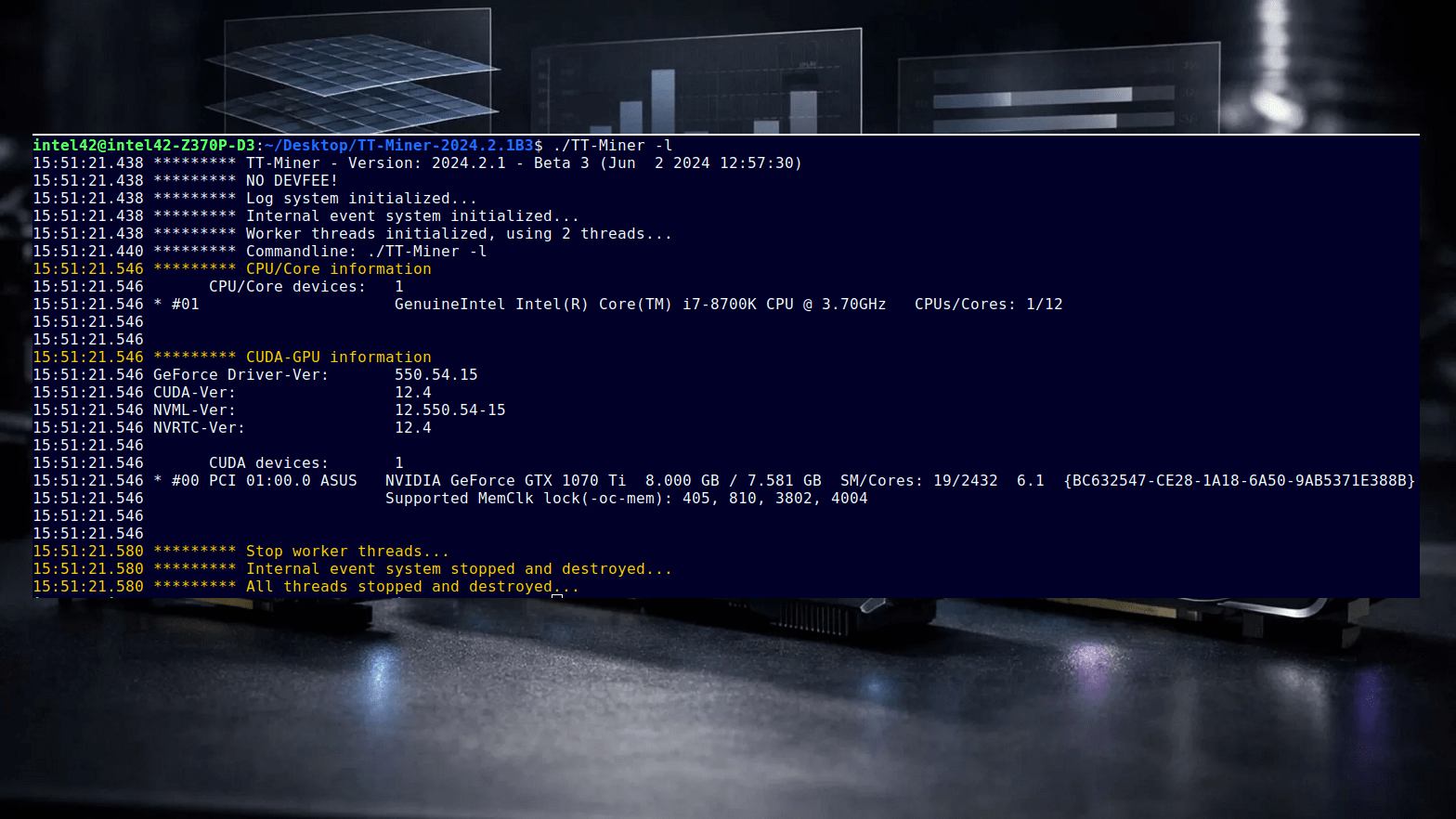
When you run the .bat file, you’ll see a message in the console about the TT-Miner version and a list of your video cards. For example:
TT-Miner 6.1.0 (по-умолчанию в настройках)
Found 2 CUDA devices
#0 PCI 01:00 GeForce GTX 1080 Ti, 11264 MB
#1 PCI 02:00 GeForce RTX 2070, 8192 MB
Use algo: PROGPOW-100
...
These lines mean the miner has detected your GPUs and is preparing to mine. If you see the “No devices found” error, check your drivers.
⚙️ Setting up a .bat file for mining
The heart of TT-Miner is the command line in a .bat file. Let’s look at the commands typically used there (based on examples from and other sources):
- First , the program name:
TradeTec-MinerCmd.exe(orTT-Miner.exein older releases). The launch file must be in the same folder as the .bat file. If your folder is calledC:\Miner\TT, make sure the executable file and the .bat file are in the same directory. - -A ALG – the mining algorithm. For example,
-A PROGPOW-100for ProgPoW (Zano/Sero),-A KAWPOWfor Ravencoin (if you have a RVN collection),-A ETHASHorETCHASHfor Ethereum Classic. You can find a list of algorithms in an online reference or on the developer’s website. If you are mining standard ETH or ETC, specify [algorithm -A]-A ETHASH(or-A ETCHASH[algorithm -A] for ETC). For Kadena (KDA), this is [algorithm -A]-A BLAKE2S. - -P – pool and wallet parameters. Format:
-P stratum+tcp://YOUR_WALLET.WORKER@POOL_URL:PORT. Example: perlCopy-P stratum+tcp://A1b2C3d4E5F6Gh7J8k9L0MNopqrS7T4z.Worker123@kda-us.icemining.ca:3700HereA1b2...S7T4zis your wallet address,Worker123the worker name (can be any, it’s for pool statistics), and then@pool:portthe pool address and port. Pool addresses are usually found on the pool’s website or in examples (e.g., coinblockers, icemining, etc.). - –list-devices – option for displaying a list of available devices (useful for debugging). This option is not required in the final .bat file, but will display all GPUs the miner is working with.
You can also add other options, such as -tc/ -mclock/ -cc for fine-tuning frequencies (see below), but for the basic version, -A and is sufficient -P. After editing, save the .bat file and run it. If everything is specified correctly, the miner will connect to the pool (a line like Subscribed to pool_url:port) and start displaying the lines “Received new job” and “Accepted.” Now your PC is mining crypto!
Command line example for Xelis V2
TT-Miner -c XEL -P <XELIS_WALLET>.<WORKER_NAME>@<POOL>:<POOL_PORT>
To limit the number of threads used, use the -t option.
Example for EPIC and the second algorithm for CPU.
TT-Miner -dEP 1 -cEP EPIC -PEP <EPIC_WALLET>.<EPIC_WORKER>@<EPIC_SERVER>:<EPIC_PORT
To use more than one algorithm, you must use TT separators. A separator is one or more capital letters. For each algorithm, you must specify the devices you want to use (-d), the coin (-c), or the algorithm (-a), as well as wallet/worker and pool information (-P). First, let’s define the EPIC algorithm:
Required information:
- -d (device)
- -c (coin)
- -P (wallet/(worker/pool)
For EPIC, we use the selector ‘EP’—you can use any you like, as long as it’s a combination of capital letters. We need to use device 1. Here’s the command line for mining only EPIC:
TT-Miner -dEP 1 -cEP EPIC -PEP <EPIC_WALLET>.<EPIC_WORKER>@<EPIC_SERVER>:<EPIC_PORT>
Now let’s add an algorithm for the CPU—select SPR. Again, we’ll need the -d, -c, and -P parameters. We’ll select ‘SP’ as the selector, and our CPU device will be assigned ID 5:
-dSP 5 -cSP SPR -PSP <SPR_WALLET>.<SPR_WORKER>@<SPR_SERVER>:<SPR_PORT>
If we add this to the existing EPIC command line, we get:
TT-Miner -dEP 1 -cEP EPIC -PEP <EPIC_WALLET>.<EPIC_WORKER>@<EPIC_SERVER>:<EPIC_PORT> -dSP 5 -cSP SPR -PSP <SPR_WALLET>.<SPR_WORKER>@<SPR_SERVER>:<SPR_PORT>
Now TT will continuously mine SPR if EPIC (ProgPoW) is active. If we want TT to mine SPR only when EPIC is active, we need to use the “join” option. We want SPR to join EPIC. Using our selectors for Spectre and EPIC, we get: -jSP EP
This means that the Spectre algorithm is combined with the Epic algorithm. This results in our final command line:
TT-Miner -dEP 1 -cEP EPIC -PEP <EPIC_WALLET>.<EPIC_WORKER>@<EPIC_SERVER>:<EPIC_PORT> -dSP 5 -cSP SPR -PSP <SPR_WALLET>.<SPR_WORKER>@<SPR_SERVER>:<SPR_PORT>b -jSP EP
Please remember to enter the information for the pool/wallet/worker and device IDs!
🌟 TT-Miner Features and Optimization Tips
TT-Miner is a very flexible tool, and it’s highly customizable. Here are a few features and recommendations mentioned in the official documentation and reviews:
- 1% developer fee. Please note that TT-Miner charges a 1% dev fee by default for all major algorithms . Some alternative algorithms (such as Epic Cash or CPU algorithms) may charge a 2% fee, but for the vast majority of coins, it’s 1%. This is a relatively low fee compared to other miners.
- Farm management: TT-Miner can monitor multiple GPUs simultaneously, organize them into a “farm,” and even switch the entire rig to a different pool or algorithm with a single click. The minerstat profile emphasizes that you can easily change coins/pools without a lengthy restart.
- Low resource consumption: As reviews note, TT-Miner is quite economical in terms of memory and CPU load. In fact, the CPU itself is almost completely unused, so it can be used for other tasks (mining itself, of course, is done on the GPU). This is convenient if you’re running multiple mining modes or want to compile something simultaneously.
- CUDA support: The miner works correctly with CUDA versions 9.2, 10.x, and 11.x. You can specify a specific CUDA version (e.g.,
-92CUDA 9.2 or-100CUDA 10.0) using options-A ETHASH-92or similar. If you don’t specify one, TT-Miner typically selects the latest available driver version. - DAG management: There’s an experimental feature that allows you to save the DAG file to disk and RAM, rather than generating it anew each time. This helps with mining on GPUs with limited memory . If you have, say, a 4 GB graphics card and the epoch becomes large, you can pre-calculate the DAG and download it to disk.
- Overclocking settings: TT-Miner allows you to lock or adjust core/memory frequencies and the GPU power limit using parameters (similar to the command
-ocon older miners). This is relevant for NVIDIA (overclocking is not available for AMD). For example, you can try slightly reducing power consumption (PWR LIMIT) or overclocking the memory to a stable limit – this will help increase the hashrate.
A few tips: always monitor your GPU temperature while mining. If the hashrate is uneven after prolonged mining, check for throttling. You can also try different mining modes (for example, the alternative ZZIL/EPIC fork if you’re looking for a little extra cash). In short, TT-Miner offers plenty of room for experimentation: as many settings as you like, so many coins!
📈 Conclusion
TT-Miner is one of the most versatile GPU miners on the market: it keeps up with the times, supporting the latest algorithms (KAWPOW, ETCHASH, etc.), while remaining easy to use. To get started on Windows, simply download the ZIP file from the official resource, unzip it, and insert your wallet and pool information into the .bat file. Keep in mind the minimum system requirements (NVIDIA, driver 441.31+, Windows x64), and that you may need to install the Visual C++ Redistributable for stable operation.
As Crazy-Mining and wrote , TT-Miner is a reliable tool for mining a wide range of cryptocurrencies on a GPU. Its 1% developer fee is well-justified by its feature set: farm management, GPU monitoring, CUDA 9–11 support, DAG storage, and much more. If you’re looking to mine alternative coins after the Ethereum era, TT-Miner is definitely worth a look. Download it from the official website, try out different settings, and let the miner console show only accepted shares and growing wallet balances!
Mining fee
| Mining | fee |
|---|---|
| Epic Cash | 2.0 % |
| CPU-algos/Ghostrider/Mike/Sha3Solidity | 2.0 % |
| Solo to Qt-Wallet | 2.0 % |
| all other | 1.0 % |
Information about supported algorithms
| Algorithm | remarks |
|---|---|
| Ethash | includes Etchash(Ethereum Classic) & Ubqhash(Ubiq) |
| EthashB3 | |
| FishHash | |
| KawPow | includes FiroPow(Firo), FiroPoWScc(SCC), MeowPow(MEOW) |
| ProgPow | includes ProgPowZ(Zano/Chinet/Evolution/NiRmata), EvrProgPow(Evrmore), vProgPow(VeriBlock) and ProgPow(Veil) |
| Ghostrider | includes Mike |
| SHA256D | |
| SHA512256D | |
| SHA256DT | |
| SHA3SOLIDITY | Sha3 Solidity for Etica, zkBTC and BNbitcoin |
| SHA3D | |
| Blake3 | |
| FLEX | CPU-only |
| SpectreX | CPU-only |
| Xelis | CPU-only |
Supported coins
| Algorithm | Coin |
|---|---|
| Ethash | AKA, ZIL, BLACK, EGEM, GRAMS, ETHO, ALT, AVS, OCTA, CLO, EXP, ETP, ETHW, ETHF, REDE, ELH, EGAZ |
| Etchash | ETC |
| EthashB3 | RTH |
| Ubqash | UBQ |
| FishHash | IRON |
| ProgPow | EPIC, SERO, VEIL |
| ProgPowZ | ZANO, EVOX |
| vProgPow | VBK |
| EvrProgPow | EVR |
| KawPow | RVN, NEOX, ARL, KAW, PRCO, SATO, HVQ, TTM, ZELS, MEWC, VTE, LAB, CLORE, PAPRY, SATOX, XNA, FRENS |
| FiroPow | FIRO, SCC |
| MeowPow | MEOW |
| Ghostrider | RTM, BTRM, BUT, YERB, JGC, NAPI, FITA, BBC, THOON, GSPC, LTR |
| Mike | VKAX |
| SHA512256D | RXD |
| SHA256DT | NEW |
| SHA256 | BTC, BCH |
| SHA3D | industrial park |
| SHA3SOLIDITY | ETI, BNBTC, ZKBTC |
| Blake3 | ALPH |
| FLEX | industrial park |
| SpectreX | SPR |
| Xelis | XEL |
Read more:
 CCMiner: How to install and use? Download and Configure for Windows
  TT-Miner 3.2.0 (Nvidia GPU miner) – Download and Configure for Windows
  XMRig v5.1.1 (RandomX, CryptoNight, Argon2) – Download and Configure for Windows
  XMRig v6.20.0. Download and configure CPU/GPU miner
  lolMiner 1.04 (AMD & Nvidia): Download and configure for Windows/Linux
  CryptoDredge 0.23.0 Nvidia GPU miner (Download and Configure for Windows)
  nanominer 1.5.1 (Nvidia & AMD miner) – Download and Configure for Windows
  GMiner v1.88 (AMD and NVIDIA miner) – Download and Configure for Windows 7/10 TT-Miner 3.0.10 (Nvidia GPU miner) Download and Configure
  TT-Miner v5.0.1: Download Nvidia GPU NoFee Miner Ravencoin (Kawpow)
  lolMiner v0.9.3 (AMD Nvidia GPUs miner) – Download and Configure for Windows
  TT-Miner 4.0.0: Download Nvidia GPU Miner With KAWPOW Support

