
November 30, Monero (XMR) will work hard on block 1978433 to switch to a new algorithm. The upcoming fork will change the current CryptoNight R mining algorithm to the new RandomX PoW algorithm, essentially transferring the coin mining to the CPU.
There are already several miners mining coins using the RandomX algorithm, which you can use now:
- XMR-STAK-RX — Monero RandomX Miner DOWNLOAD
- XMRig v5.1.0 (RandomX/Monero XMR, CryptoNight, Argon2)
- SRBMiner-MULTI (RandomX) CPU и AMD GPU Miner
Content:
- How to mine Monero (XMR) on RandomX algorithm
- XMR-STAK Setup Instructions:
- Download and configure XMR-STAK-RX
- How to run RandomX mining?
- Launch XMR-STAK-RX
- Example batch file settings
- Instructions for configuring XMRig:
- Download and configure XMRig
- Example batch file for processors
- Example batch file for AMD
- Example batch file for Nvidia
- Instructions for setting up SRBMiner-MULTI:
- Download and configure SRBMiner-MULTI
- Configure SRBMiner-MULTI
- Batch file example
- Video guides how to mine on RandomX;
- Conclusion
How to mine Monero on RandomX algorithm
XMR-STAK Setup Instructions:
The developers of the XMR-STAK program released the initial version to support the RandomX algorithm – the xmr-stak-rx program.
Download and configure XMR-STAK-RX:
In the new version there is no commission for development, it will probably be added later.
This release only supports various variants of the RandomX algorithm.
How to run RandomX mining in XMR-STAK?
- Download and unzip precompiled binary (.EXE) files to a new folder
- Change parameter currency in
pools.txton"currency": "randomx",pool configuration example - Run
xmr-stak-rxthrough bat file
Launch XMR-STAK-RX
You can run the program through the bat file too:

Example batch file settings:
xmr-stak-rx.exe -o xmr-eu.dwarfpool.com:8050 -u 44tLjmXrQNrWJ5NBsEj2R77ZBEgDa3fEe9GLpSf2FRmhexPvfYDUAB7EXX1Hdb3aMQ9FLqdJ56yaAhiXoRsceGJCRS3Jxkn.5d3c802ee0f8e12e4eb9792722b7816a42178aa29ef7477c138ddb940c55648d.rig1 -p x --noCPU
pause
If you do not want to mine Monero / Random X after forking on video cards, run xmr-stak-rx once before the fork and let the miner create amd.txt and / or nvidia.txt configurations. Edit both files and set “gpu_threads_conf”: [] to disable the video cards and leave only the processor.
If the application does not start properly, make sure the Visual Studio libraries are installed. You can download them from
Instructions for configuring XMRig:
Similarly, you can use the Xmrig program.
Download and configure XMRig:
- XMRig v5.2.0 (RandomX, CryptoNight, Argon2)
- XMRig v5.1.0 (Random X/Monero XMR, CryptoNight, Argon2)
- Download XMRig 3.2.0 (RandomX, CryptoNight and Argon2 CPU miner)
An example of a batch file for processors:
:start
xmrig -a randomx -o pool.supportxmr.com:5555 -u 44tLjmXrQNrWJ5NBsEj2R77ZBEgDa3fEe9GLpSf2FRmhexPvfYDUAB7EXX1Hdb3aMQ9FLqdJ56yaAhiXoRsceGJCRS3Jxkn.5d3c802ee0f8e12e4eb9792722b7816a42178aa29ef7477c138ddb940c55648d.rig1 -p x --donate-level=1
goto start
Example batch file for AMD:
:start
xmrig -a randomx -o pool.supportxmr.com:5555 -u 44tLjmXrQNrWJ5NBsEj2R77ZBEgDa3fEe9GLpSf2FRmhexPvfYDUAB7EXX1Hdb3aMQ9FLqdJ56yaAhiXoRsceGJCRS3Jxkn.5d3c802ee0f8e12e4eb9792722b7816a42178aa29ef7477c138ddb940c55648d.rig1 -p x --donate-level=1 --opencl
goto start
An example of a batch file for Nvidia:
:start
xmrig -a randomx -o pool.supportxmr.com:5555 -u 44tLjmXrQNrWJ5NBsEj2R77ZBEgDa3fEe9GLpSf2FRmhexPvfYDUAB7EXX1Hdb3aMQ9FLqdJ56yaAhiXoRsceGJCRS3Jxkn.5d3c802ee0f8e12e4eb9792722b7816a42178aa29ef7477c138ddb940c55648d.rig1 -p x --donate-level=1 --cuda
goto start
Instructions for setting up SRBMiner-MULTI:
SRBMiner-MULTI CPU is a program for mining cryptocurrencies on various algorithms for the processor.
AMD GPU Miner is a miner for mining cryptocurrencies on video cards of the AMD family.
Both programs are part of a single release.
Download and configure SRBMiner-MULTI:
Configure SRBMiner-MULTI
In order to start mining, we need to create or edit a file with the extension .bat. Indicate the following commands in it:
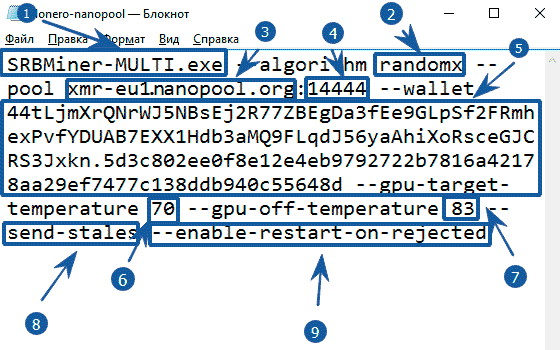
- SRBMiner-MULTI.exe — SRBMiner application launch command
- —algorithm randomx — specify the algorithm for mining
- —pool xmr-eu1.nanopool.org — specify pool address
- 14444 — specify pool port
- —wallet 44tLjmXrQN2df…477c138d2340c55648d indicate coin purse + Payment ID after the point. The wallet can be obtained either on the exchange or install a cold Monero wallet.
- —gpu-target-temperature 70 — the program will strive to maintain this temperature
- —gpu-off-temperature 83 — the miner will turn off when this temperature is reached and turn on when it drops
- —send-stales — send outdated balls to the pool (some pools partially pay for them, or add bonuses).
- —enable-restart-on-rejected —auto miner restart if too many rejected ball
Example batch file:
setx GPU_MAX_HEAP_SIZE 100
setx GPU_MAX_USE_SYNC_OBJECTS 1
setx GPU_MAX_ALLOC_PERCENT 100
setx GPU_MAX_SINGLE_ALLOC_PERCENT 100
@echo off
cd %~dp0

cls
set LOGTIME=%date:~10,4%_%date:~4,2%_%date:~7,2%_%time:~0,2%_%time:~3,2%
set LOGTIME=%LOGTIME: =%
set LOGTIME=%LOGTIME:,=.%.txt

SRBMiner-MULTI.exe --algorithm randomx --pool xmr-eu1.nanopool.org:14444 --wallet 44tLjmXrQNrWJ5NBsEj2R77ZBEgDa3fEe9GLpSf2FRmhexPvfYDUAB7EXX1Hdb3aMQ9FLqdJ56yaAhiXoRsceGJCRS3Jxkn.5d3c802ee0f8e12e4eb9792722b7816a42178aa29ef7477c138ddb940c55648d.rig1
pause
The program starts as usual by double-clicking on the file with the extension .bat
Running the program, we will see the following window:
We wrote in the batch file only those teams that will helpConnect to the pool and start the cryptocurrency mining process. However, to improve performance, you need to configure some other command line arguments, depending on the type of equipment you have.
Video guides how to mine on RandomX
Conclusion
Please note that some of these miners also support AMD or Nvidia graphics cards, but you probably want to stick with CPU mining as it is much more profitable.
In addition, as already noted, the AMD Ryzen 3000 series processors work perfectly with Random X, and they are much better in performance than the latest alternatives from Intel.
Recommended Related Articles:
- [NoDevFee] How to disable DevFee (commission) in the miner
- Claymore Dual v15.0 (AMD+NVIDIA GPU Miner) (download for Windows/Linux)
- ATIFlash / ATI WinFlash 2.9.3 (BIOS flashing) download
- OverdriveNTool – tool for AMD [Download]
- OhGodAnETHlargementPill – Tablet for mining GTX 1080, GTX 1080 Ti (DOWNLOAD)
Read more:
 XMRig v5.5.0 (NoDevFee): RandomX, CryptoNight and Argon2 CPU/GPU miner
  XMRig v5.5.1: RandomX, CryptoNight and Argon2 CPU/GPU miner
  Download XMRig 2.14.6 – Monero AMD (OpenCL) miner XMRig v5.5.0/5.4.0 (RandomX, CryptoNight and Argon2 CPU/GPU miner)
  BLOC GUI Miner: mining CryptoNight/CryptoNote/RandomX on CPU and GPU
  RagerX (RandomX): new miner for Monero (XMR)
  XMRig 5.6.0: RandomX, CryptoNight and Argon2 CPU/GPU miner Monero XMRig v5.1.0 (RandomX/Monero XMR, CryptoNight, Argon2)
  XMR-STAK-RX – Download CPU & GPU AMD NVIDIA Miner Monero RandomX
  SRBMiner v0.1.8 beta – Kadena algorithm added
  XMRig 5.9.0: GPU/CPU Miner With New RandomKEVA Algorithm Supported
  SRBMINER-MULTI v0.1.8: Download CPU and AMD GPU Miner RandomX

