
A comprehensive guide to overclocking GPUs for crypto mining: how to increase the hashrate of NVIDIA and AMD graphics cards, select core, memory, and power consumption settings, and consider cooling and risks (warranty, BIOS lockup, overheating). Practical tips with examples for Ethereum, Kaspa, Ravencoin, and other coins.
🚀 Basics of Overclocking Video Cards for Mining
Overclocking a graphics card involves adjusting its clock speed and voltage to increase its mining performance (hashrate). When mining cryptocurrencies (such as Ethereum, Kaspa, Ravencoin, Ethereum Classic, etc.), additional hashrate can be squeezed out of each core and memory frequency. It’s important to understand that mining is a long-term workload, so the key goals are to find a balance between hash rate and power consumption while maintaining stability. As Crazy-Mining notes , overly aggressive overclocking and inadequate cooling can indeed damage a graphics card, but moderate settings make mining relatively safe.
Modern NVIDIA and AMD graphics cards have different architectures and overclocking tools. We all adjust the core clock and memory clock, as well as the power limit and voltage. NVIDIA often uses MSI Afterburner, while AMD uses OverdriveNTool or specialized tools (for example, MorePowerTool for Navi cards). Overclocking is done gradually, monitoring temperature and stability. According to , it’s important to “enter the desired overclocking and undervolting values” (reduced voltage) into the utility profile and run it at system startup. This way, your graphics card will automatically operate at its optimal level.
🔥 Hashrate Boost: Core, Memory, and Power Consumption
Hashrate optimization involves three main areas: increasing core and memory frequencies and reducing power consumption (undervolting). As noted by Crazy-Mining , “in mining, every percentage point in GPU performance matters, just as much as 1 watt of power consumption.” Increasing the core frequency speeds up algorithm calculations, while increasing the memory frequency is especially important for Ethash and KawPow—the algorithms used by Ethereum, Ravencoin, and others. Typically, the memory is overclocked more than the core (e.g., +900…+1500 MHz for memory and +50…+150 MHz for the core).
However, it’s important to monitor power consumption. Undervolting allows for higher frequencies with the same power consumption or lower power consumption with the same frequency. Power Limit profiles exist for AMD and NVIDIA cards—for example, you can set the limit to 60–75% of the maximum and still achieve almost the same hashrate, while significantly reducing heat and power consumption. Miners’ experience suggests that when overclocking the NVIDIA RTX 3070, they set the Core +100 MHz, Mem +950 MHz, and reduce the Power Limit to ~60%, which yields around 30 MH/s on the Ethash algorithm. For the RTX 3060, 100/+950 MHz and ~60% of the power (approximately 20 MH/s) are sufficient. These data show that with proper settings, it’s possible to significantly increase the hashrate without excessive power consumption.
When overclocking, it’s often recommended to reduce power consumption—so-called “ECO settings.” This is reflected in manuals: for example, Crazy-Mining recommends testing frequency increases in small increments and monitoring temperature, error rates, and hashrate. After each increment, the operating conditions are assessed, and if they deteriorate, the previous value is restored. This approach allows for stable overclocking without any performance degradation.
🛠️ Useful utilities for GPU overclocking
There are several popular overclocking programs:
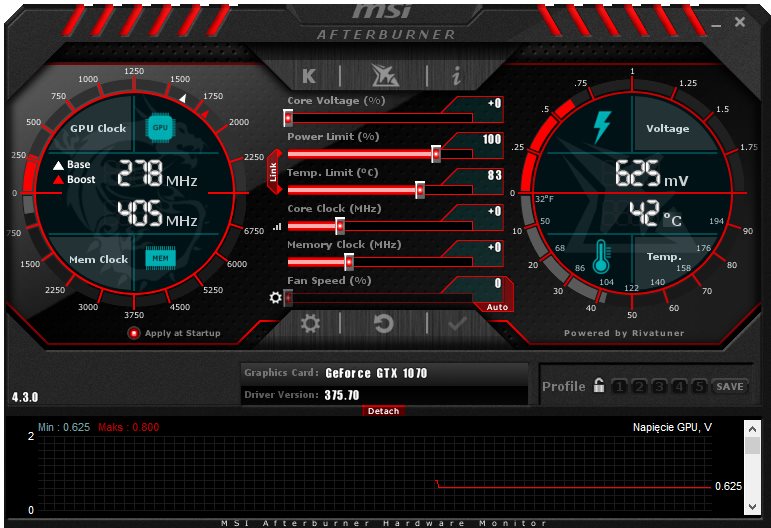
- MSI Afterburner (NVIDIA, AMD) is a versatile tool with a graphical interface. It allows you to adjust Core Clock, Memory Clock, Power Limit, and (after unlocking) voltage. By default, the Core Voltage slider is locked, as uncontrolled voltage overclocking is dangerous. The article describes how to unlock “Unlock Voltage Control” in the settings and even in the MSI Afterburner configuration file. Once unlocked, you can lower the voltage to reduce temperatures. MSI Afterburner can save overclocking profiles and apply them at system startup—a convenient feature once you’ve verified the settings are stable.
- OverdriveNTool (AMD) is a utility for fine-tuning Radeon graphics cards (Polaris, Vega, Navi, and other architectures) via the OverdriveN API. It allows you to change frequencies, voltages, fan curves, and even edit the SoftPowerPlayTable BIOS. reports that OverdriveNTool is easy to learn: simply launch the program, examine the factory settings, and save your custom overclocking profile to an INI file. The utility warns you if you select an unsupported card, and in such cases, recommends using MSI Afterburner or a third-party BIOS flasher.
- MorePowerTool (AMD) is a program for fine-tuning AMD Navi graphics cards (RX 5600/5700/6700 XT, etc.) and their newer versions. It allows you to reduce power consumption (TDP), increase frequencies, and adjust voltage curves. Crazy-Mining notes that MorePowerTool is unofficial software and is not supported by AMD, but with proper use, “you can significantly improve the efficiency of your graphics card.” A review of the changelog shows that the new software optimized support for the RX 6800/6900, fixed bugs, and added TGP control capabilities, simplifying overclocking and reducing software version conflicts.
- Other tools: ATI Tray Tools (for AMD), (for modifying BIOS), Polaris BIOS Editor (for editing AMD memory timings), etc. You should also use special mining drivers : for Ethereum on NVIDIA, there are driver versions with DevFee disabled and a higher hashrate ( ).
🌡️ Cooling and energy saving in mining
When overclocking, it’s especially important to improve the cooling system and power management. Cooling can be air-cooled (powerful coolers, dust removal), liquid (closed or immersion cooling systems), or hybrid. in its article on rig optimization, recommends improving cooling and monitoring power consumption. The lower the GPU temperature, the better the stability: try to keep the chips below 70–75°C (the key goal), and even lower (80–85°C) for video memory to ensure longevity. It’s also important to monitor fan speeds—during overclocking, the load increases, so fans should run at 60–80% or more, depending on the conditions.
Power consumption can be optimized in two ways: reducing consumption while maintaining the same frequency or increasing the frequency without increasing consumption. This can be achieved by undervolting (reducing the GPU voltage), flashing the BIOS with an optimized VBIOS, or using special power profiles. For example, on some AMD cards (Radeon series), you can edit the SoftPowerPlay table and disable “PowerLimit” to prevent the card from sacrificing frequency when reaching temperatures or power consumption. When using MSI Afterburner or OverdriveNTool, it’s worth checking the Core Voltage and Power Limit parameters. recommends enabling automatic overclocking at system startup only after several successful tests to avoid risky boot errors.
Additionally, you can use energy-saving methods at the farm level: suggests undervolting, regular cleaning, and even solar power for maximum ROI. But remember, any changes should be made gradually, monitoring the results.
🆚 NVIDIA and AMD Overclocking: Tuning Features

NVIDIA (GeForce):
Most GeForce cards (RTX 30/40 series, GTX 10/16) can only unlock voltage using MSI Afterburner or similar software. In newer architectures (Ampere, Ada Lovelace), pay attention to LHR locks (hashrate limit for Ethereum). On NVIDIA, these are disabled either using the 470.05 “mining driver” or third-party utilities ( OHGodAnETHlargementPill ). When overclocking, NVIDIA typically sets the power limit to 60–75% and gradually increases frequencies. For example, for the RTX 3070/3080, a +100 core/+950 memory profile is common, while for the RTX 3090, a slightly higher core (+150 MHz) is acceptable. The GTX series (1070, 1080, 1660) also respond well to similar overclocking.
AMD (Radeon):
Radeon cards (Rx 5000/6000 series, Vega, etc.) are slightly more complex to configure. Two utilities are often used: OverdriveNTool (for Polaris/Vega) and MorePowerTool (for Navi). Polaris cards (RX 400/500) can also be overclocked via the BIOS (Polaris BIOS Editor) and MSI Afterburner. Many AMD cards support advanced power management features (for example, TGP and TDC in Navi). recommends examining the factory settings using OverdriveNTool and then manually recording an overclocking profile and fan modes. AMD cards also often require VBIOS editing to increase Wattman limits. When overclocking AMD cards, it’s wise to reduce power consumption and manage frequencies wisely: for example, increase the memory on the RX 580 by 1000+ MHz, and the core by a minimum, and then measure the hashrate increase.
Overall, GPU overclocking for mining is similar for both platforms: you work with clock speeds and power, but the tools differ. notes that OverdriveNTool won’t work on some GPUs (for example, older R9 280s), so MSI Afterburner or a third-party BIOS is used. Always make sure your drivers and software are up-to-date (for AMD, use version 20.45 or higher, and for NVIDIA, use optimized mining drivers).
⚠️ Risks and precautions
Overheating: The main risk when overclocking is high temperatures. Without adequate cooling, GPUs can throttle (reduce clock speeds) or fail. Keep fans and heatsinks clean, add additional case coolers, or switch to liquid cooling. Any utility allows you to set a critical temperature at which the miner will stop working (e.g., 80°C). Crazy-Mining emphasizes: check your changes after each step: if the error rate increases, the hashrate drops, or the card reboots, you’re overclocking too aggressively.
Warranty: Overclocking may affect the manufacturer’s warranty. Generally, tampering with temperature and frequency settings is critical—any modification of voltage or frequency is officially considered “modding.” Crazy-Mining warns that “overclocking may reduce the lifespan of the device and affect your warranty. Always test changes gradually.” This is important to remember: reputable manufacturers (MSI, ASUS, AMD, NVIDIA) typically will not repair a card with custom BIOS settings or a corrupted VBIOS.
BIOS Lock: Some newer graphics cards (such as NVIDIA CMP series or Pascal cards) may have BIOS signatures and special signatures that protect the firmware from unofficial modifications. Third-party utilities and firmware bypass these protections, but the manufacturer may lock the card if it repeatedly encounters errors. Therefore, when using PhoenixBIOS or ATIFlash, read the instructions very carefully. If the card is not detected after flashing, resetting the BIOS settings (jumpers on the motherboard) or a complete clean installation of the drivers can sometimes help.
Power consumption and electrical system: Ensure your rig’s power supply (and wiring) are rated for the increased load. Overclocking almost always increases overall power consumption (despite undervolting, the card lasts longer under heavy load). Use high-quality 80 Plus-certified power supplies and maintain sufficient power reserves. Finally, monitor the stability of your power supply—voltage surges can kill even an overclocked GPU faster than a standard one.
Overall, the main advice is to take your time and test : the approach described in and Crazy-Mining instructions involves gradually increasing frequencies and constantly monitoring parameters. The hashrate can be adjusted individually for each coin. For example, Ethereum (Ethash) typically requires powerful memory, while Kaspa scales well on a single core. Up-to-date overclocking recommendations for specific algorithms are often published on forums and websites: NiceHash offers lists of settings for different GPUs and coins, and Crypto-Mining.Blog regularly updates its utilities.
💡 Examples of optimal settings for popular coins
- Ethereum (Ethash): The main focus is on memory clock. For example, on the GeForce RTX 3070, a common setup is Core +100 MHz, Memory +950 MHz, and Power Limit 60% , resulting in ~30 MH/s ). The AMD RX 580 is typically overclocked like this: Core +100, Memory +1000, and Power Limit 70%, which yields around 30 MH/s. For newer AMD cards (RX 6800/6900 XT), you can boost the core by +150 and the memory by +1000, reducing PL to ~68%.
- Ethereum Classic (ETC): Similar to Ethash, the same profiles can be used. Recommended settings for NVIDIA GTX/RTX are +140 cores/+1500 memory and 70-100% TDP. For AMD RX, the recommended settings are +10 cores/+1000 memory (the core settings don’t need to be overstated; memory is often the focus).
- Ravencoin (KawPow): The GPU is less dependent on memory, and the core is more important. NiceHash suggests +100 cores/+950 memory, ~60% TDP for the RTX 3070 , yielding ~30 MH/s ). For the RTX 3060, +100/+950, 60% TDP, ~27 MH/s. The AMD RX 5700 XT offers +50 cores/+1000 memory, 65% Power, yielding 25–28 MH/s.
- Kaspa (KHeavyHash): This algorithm scales well across cores. For NVIDIA, it’s recommended to increase Core by +100 to +150, while memory can be left at +0 to +300. Undervolting is mandatory (e.g., VCore -50 to -100 mV). RTX 3080 cards deliver 2000+ sol/s. AMD cards: RX 580/590 set Core to +140/+0 mem, and Power Limit to 75%.
- Other coins (Etc.): For example, for Ergo (Autolykos) on AMD, it’s important to remove the Power Limit and increase the Core. For Polygon (MTP), on the contrary, keep memory and core to a minimum (VRAM plays a major role). On all cards, it’s worth reducing the voltage each time you overclock.
In any case, sources Crazy-Mining and recommend experimenting with a single card: find a stable profile on one video card and then duplicate it on all other GPUs in the rig, checking for stability.
Let’s sum it up
Overclocking a graphics card for mining is a fine-tuning process that can significantly increase profitability. By following step-by-step instructions (increasing clock speeds, monitoring power consumption, and ensuring proper cooling) and relying on proven utilities (MSI Afterburner, OverdriveNTool, MorePowerTool), you can optimize your GPU hashrate for Ethereum, Ravencoin, Kaspa, and other coins. Always consider the risks (warranty, overheating, BIOS lockup) and make adjustments gradually. Remember to confirm any advice with your own measurements—optimal settings may vary even for identical graphics cards.
Read more:
 AMD graphics cards for mining, overclocking and tuning guide
  Mining video cards (GPU) – what is it and how to choose it?
  A video card error code is 43. Windows stopped this device.
  How to choose a graphics card for mining? Nvidia or AMD
  MorePowerTool 1.3.8: fine-tuning AMD graphics cards for mining
  Mining on the new Nvidia RTX 2060 GPU
  Overview on AMD Radeon RX VEGA 64 for mining
  Temperature conditions in the mining of cryptocurrencies on the CPU and GPU
  T-Rex miner – a detailed review and setup for NVIDIA (download, config, overclock, errors)
  lolMiner 1.64: dual and triple mining ETC + KAS + ZIL
  MSI Afterburner 4.5.0: Download graphics card utility for Windows
  How to start mining cryptocurrency FIRO (Zcoin)

